


The official CLI for the MiniMax AI Platform
Built for AI agents. Generate text, images, video, speech, and music — from any agent or terminal.
中文文档 · Global Platform · CN Platform · Example
## Features - **Text** — Multi-turn chat, streaming, system prompts, JSON output - **Image** — Text-to-image with aspect ratio and batch controls - **Video** — Async video generation with progress tracking - **Speech** — TTS with 30+ voices, speed control, streaming playback - **Music** — Text-to-music with lyrics, instrumental mode, auto lyrics, and cover generation from reference audio - **Vision** — Image understanding and description - **Search** — Web search powered by MiniMax - **Dual Region** — Seamless Global (`api.minimax.io`) and CN (`api.minimaxi.com`) support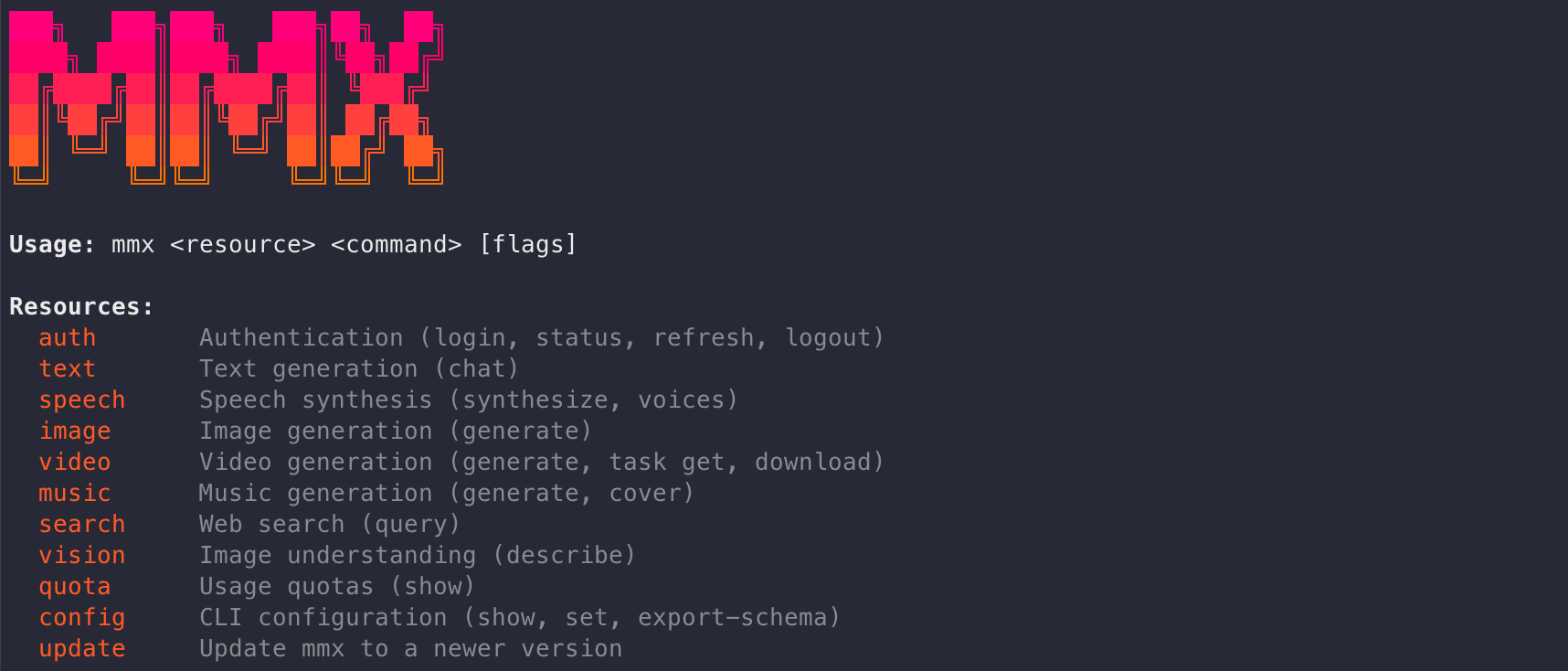 ## Install
```bash
# For AI agents (OpenClaw, Cursor, Claude Code, etc.): add skill to your agent
npx skills add MiniMax-AI/cli -y -g
# Or install CLI globally for terminal use
npm install -g mmx-cli
```
> Requires [Node.js](https://nodejs.org) 18+
> **Requires a MiniMax Token Plan** — [Global](https://platform.minimax.io/subscribe/token-plan) · [CN](https://platform.minimaxi.com/subscribe/token-plan)
## Quick Start
```bash
# Authenticate (interactive — choose MiniMax OAuth or paste an API key)
mmx auth login
# Or non-interactive
mmx auth login --api-key sk-xxxxx
# Start creating
mmx text chat --message "What is MiniMax?"
mmx image "A cat in a spacesuit"
mmx speech synthesize --text "Hello!" --out hello.mp3
mmx video generate --prompt "Ocean waves at sunset"
mmx music generate --prompt "Upbeat pop" --lyrics "[verse] La da dee, sunny day"
mmx search "MiniMax AI latest news"
mmx vision photo.jpg
mmx quota
```
## Commands
### `mmx text`
```bash
mmx text chat --message "Write a poem"
mmx text chat --model MiniMax-M2.7-highspeed --message "Hello" --stream
mmx text chat --system "You are a coding assistant" --message "Fizzbuzz in Go"
mmx text chat --message "user:Hi" --message "assistant:Hey!" --message "How are you?"
cat messages.json | mmx text chat --messages-file - --output json
```
### `mmx image`
```bash
mmx image "A cat in a spacesuit"
mmx image generate --prompt "A cat" --n 3 --aspect-ratio 16:9
mmx image generate --prompt "Logo" --out-dir ./out/
```
### `mmx video`
```bash
mmx video generate --prompt "Ocean waves at sunset" --download sunset.mp4
mmx video generate --prompt "A robot painting" --async
mmx video task get --task-id 123456
mmx video download --file-id 176844028768320 --out video.mp4
```
### `mmx speech`
```bash
mmx speech synthesize --text "Hello!" --out hello.mp3
mmx speech synthesize --text "Stream me" --stream | mpv -
mmx speech synthesize --text "Hi" --voice English_magnetic_voiced_man --speed 1.2
echo "Breaking news" | mmx speech synthesize --text-file - --out news.mp3
mmx speech voices
```
### `mmx music`
```bash
# Generate with lyrics
mmx music generate --prompt "Upbeat pop" --lyrics "[verse] La da dee, sunny day" --out song.mp3
# Auto-generate lyrics from prompt
mmx music generate --prompt "Indie folk, melancholic, rainy night" --lyrics-optimizer --out song.mp3
# Instrumental (no vocals)
mmx music generate --prompt "Cinematic orchestral" --instrumental --out bgm.mp3
# Cover — generate a cover version from a reference audio file
mmx music cover --prompt "Jazz, piano, warm female vocal" --audio-file original.mp3 --out cover.mp3
mmx music cover --prompt "Indie folk" --audio https://example.com/song.mp3 --out cover.mp3
```
### `mmx vision`
```bash
mmx vision photo.jpg
mmx vision describe --image https://example.com/img.jpg --prompt "What breed?"
mmx vision describe --file-id file-123
```
### `mmx search`
```bash
mmx search "MiniMax AI"
mmx search query --q "latest news" --output json
```
### `mmx auth`
```bash
mmx auth login # interactive: pick OAuth (Global / China) or paste an API key
mmx auth login --api-key sk-xxxxx # save an API key directly
mmx auth login --recommend # skip the menu, pick OAuth region interactively
mmx auth login --recommend --region=global # OAuth → api.minimax.io
mmx auth login --recommend --region=cn # OAuth → api.minimaxi.com
mmx auth status
mmx auth refresh
mmx auth logout
```
`mmx auth status` is the canonical way to verify active authentication.
Both OAuth and API-key credentials live in `~/.mmx/config.json` (the two are
mutually exclusive — logging in with one method clears the other). API keys
can also be passed per command via `--api-key`. With an API key, the region
is auto-detected by probing both Global and CN.
### `mmx config` · `mmx quota`
```bash
mmx quota
mmx config show
mmx config set --key region --value cn
mmx config set --key default-text-model --value MiniMax-M2.7-highspeed
mmx config export-schema | jq .
```
### `mmx update`
```bash
mmx update
mmx update latest
```
## Thanks to
## Install
```bash
# For AI agents (OpenClaw, Cursor, Claude Code, etc.): add skill to your agent
npx skills add MiniMax-AI/cli -y -g
# Or install CLI globally for terminal use
npm install -g mmx-cli
```
> Requires [Node.js](https://nodejs.org) 18+
> **Requires a MiniMax Token Plan** — [Global](https://platform.minimax.io/subscribe/token-plan) · [CN](https://platform.minimaxi.com/subscribe/token-plan)
## Quick Start
```bash
# Authenticate (interactive — choose MiniMax OAuth or paste an API key)
mmx auth login
# Or non-interactive
mmx auth login --api-key sk-xxxxx
# Start creating
mmx text chat --message "What is MiniMax?"
mmx image "A cat in a spacesuit"
mmx speech synthesize --text "Hello!" --out hello.mp3
mmx video generate --prompt "Ocean waves at sunset"
mmx music generate --prompt "Upbeat pop" --lyrics "[verse] La da dee, sunny day"
mmx search "MiniMax AI latest news"
mmx vision photo.jpg
mmx quota
```
## Commands
### `mmx text`
```bash
mmx text chat --message "Write a poem"
mmx text chat --model MiniMax-M2.7-highspeed --message "Hello" --stream
mmx text chat --system "You are a coding assistant" --message "Fizzbuzz in Go"
mmx text chat --message "user:Hi" --message "assistant:Hey!" --message "How are you?"
cat messages.json | mmx text chat --messages-file - --output json
```
### `mmx image`
```bash
mmx image "A cat in a spacesuit"
mmx image generate --prompt "A cat" --n 3 --aspect-ratio 16:9
mmx image generate --prompt "Logo" --out-dir ./out/
```
### `mmx video`
```bash
mmx video generate --prompt "Ocean waves at sunset" --download sunset.mp4
mmx video generate --prompt "A robot painting" --async
mmx video task get --task-id 123456
mmx video download --file-id 176844028768320 --out video.mp4
```
### `mmx speech`
```bash
mmx speech synthesize --text "Hello!" --out hello.mp3
mmx speech synthesize --text "Stream me" --stream | mpv -
mmx speech synthesize --text "Hi" --voice English_magnetic_voiced_man --speed 1.2
echo "Breaking news" | mmx speech synthesize --text-file - --out news.mp3
mmx speech voices
```
### `mmx music`
```bash
# Generate with lyrics
mmx music generate --prompt "Upbeat pop" --lyrics "[verse] La da dee, sunny day" --out song.mp3
# Auto-generate lyrics from prompt
mmx music generate --prompt "Indie folk, melancholic, rainy night" --lyrics-optimizer --out song.mp3
# Instrumental (no vocals)
mmx music generate --prompt "Cinematic orchestral" --instrumental --out bgm.mp3
# Cover — generate a cover version from a reference audio file
mmx music cover --prompt "Jazz, piano, warm female vocal" --audio-file original.mp3 --out cover.mp3
mmx music cover --prompt "Indie folk" --audio https://example.com/song.mp3 --out cover.mp3
```
### `mmx vision`
```bash
mmx vision photo.jpg
mmx vision describe --image https://example.com/img.jpg --prompt "What breed?"
mmx vision describe --file-id file-123
```
### `mmx search`
```bash
mmx search "MiniMax AI"
mmx search query --q "latest news" --output json
```
### `mmx auth`
```bash
mmx auth login # interactive: pick OAuth (Global / China) or paste an API key
mmx auth login --api-key sk-xxxxx # save an API key directly
mmx auth login --recommend # skip the menu, pick OAuth region interactively
mmx auth login --recommend --region=global # OAuth → api.minimax.io
mmx auth login --recommend --region=cn # OAuth → api.minimaxi.com
mmx auth status
mmx auth refresh
mmx auth logout
```
`mmx auth status` is the canonical way to verify active authentication.
Both OAuth and API-key credentials live in `~/.mmx/config.json` (the two are
mutually exclusive — logging in with one method clears the other). API keys
can also be passed per command via `--api-key`. With an API key, the region
is auto-detected by probing both Global and CN.
### `mmx config` · `mmx quota`
```bash
mmx quota
mmx config show
mmx config set --key region --value cn
mmx config set --key default-text-model --value MiniMax-M2.7-highspeed
mmx config export-schema | jq .
```
### `mmx update`
```bash
mmx update
mmx update latest
```
## Thanks to